TextEditor widget
Path: Widget Gallery> Advanced> Editor
Use this widget to edit text files. Widget can load the text file from the local HMI device or download the file from a remote device using an ftp connection.
Note: TextEditor widget is available as a plugin (see "Plug-in" for details) to download to the JMobile HMI Runtime only when required.
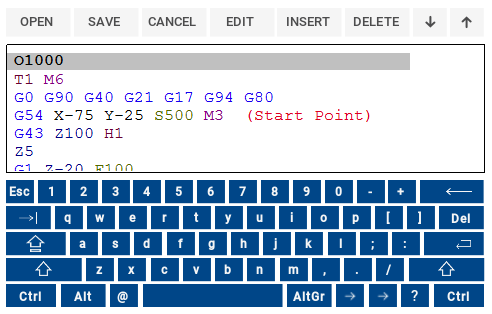
Widget Buttons
| Button | Description |
|---|---|
| Open | Load text file inside the TextEditor |
| Save | Save text file |
| Cancel | Remove all changes from last OPEN or SAVE command |
| Edit | Enter in edit mode |
| Insert | Insert a new line |
| Delete | Delete current line |
| Up/Down | Move cursor up/down |
Widget Properties
| Option | Description | ||||||||||||
|---|---|---|---|---|---|---|---|---|---|---|---|---|---|
| Keyboard |
TextEditor widget has an embedded keyboard. When widget is used without the embedded keyboard, the alphabetic keyboard will be displayed when enter edit mode.
|
||||||||||||
| FTP Config |
FTP parameters to download the text file from a remote FTP server. Leave this filed empty to load the text file from the local HMI device.
|
||||||||||||
| File Name | File name to edit. When empty a file browser to load a local file will be opened | ||||||||||||
| Syntax Highlight Type |
Displays text in different colors according to the selected language
|